No instruments. No music theory. Move at your own pace.
your voice.
NOTE TO MYSELF
“Widen the aperture. What do you see?”
A thought worth keeping.
FROM A MOMENT → TO A MELODY
Capture a thought → Find the thread → Give it a sound → Listen with curiosity
WHY PUT FEELINGS INTO A SONG?
Hear your own words from a little distance.
A journal holds an experience. A lyric gives it shape. Music lets you hear it in a different way.
This is an invitation to explore your feelings through creative expression. Turning words into something you can listen to may offer a new perspective. Your response is personal: you don’t need to reach a conclusion or feel better on command.
The therapeutic explanation behind this approach is presented in David’s GAATS framework: write, choose a sound, listen, explore alternatives, and reflect.
An educational reflection activity. This specific AI-assisted framework has not been established as a clinical treatment and does not replace mental health care.
DAVID’S REAL EXAMPLE · NOVEMBER 12, 2026
A song began in my text messages.
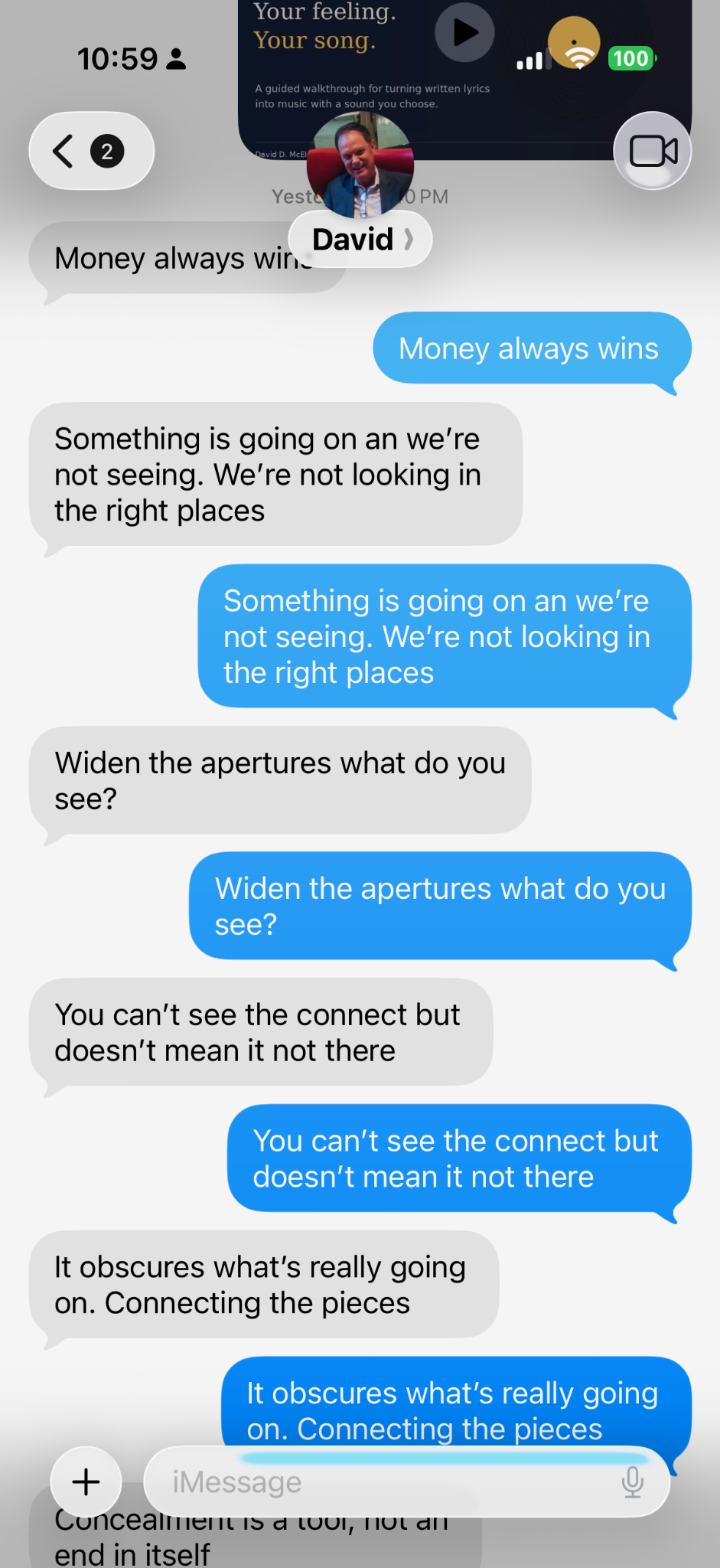
Ordinary fragments. Saved as they arrived. Later, a thread began to appear.
“When I hear an idea that catches my attention, I text it to myself. When I have enough, I organize them and paste them into Google Deep Research, then work through the generation steps to create a song.”
— David D. McElroy
01 / Catch the ideas02 / Keep collecting
FINDING THE THREAD
From scattered thoughts to “Widen the Aperture.”
These are the phrases David used to create today’s song. They don’t begin as polished lyrics, and they don’t have to.
A question“We’re not looking in the right places.”
A central image“Widen the apertures—what do you see?”
A recurring theme“Connecting the pieces.”
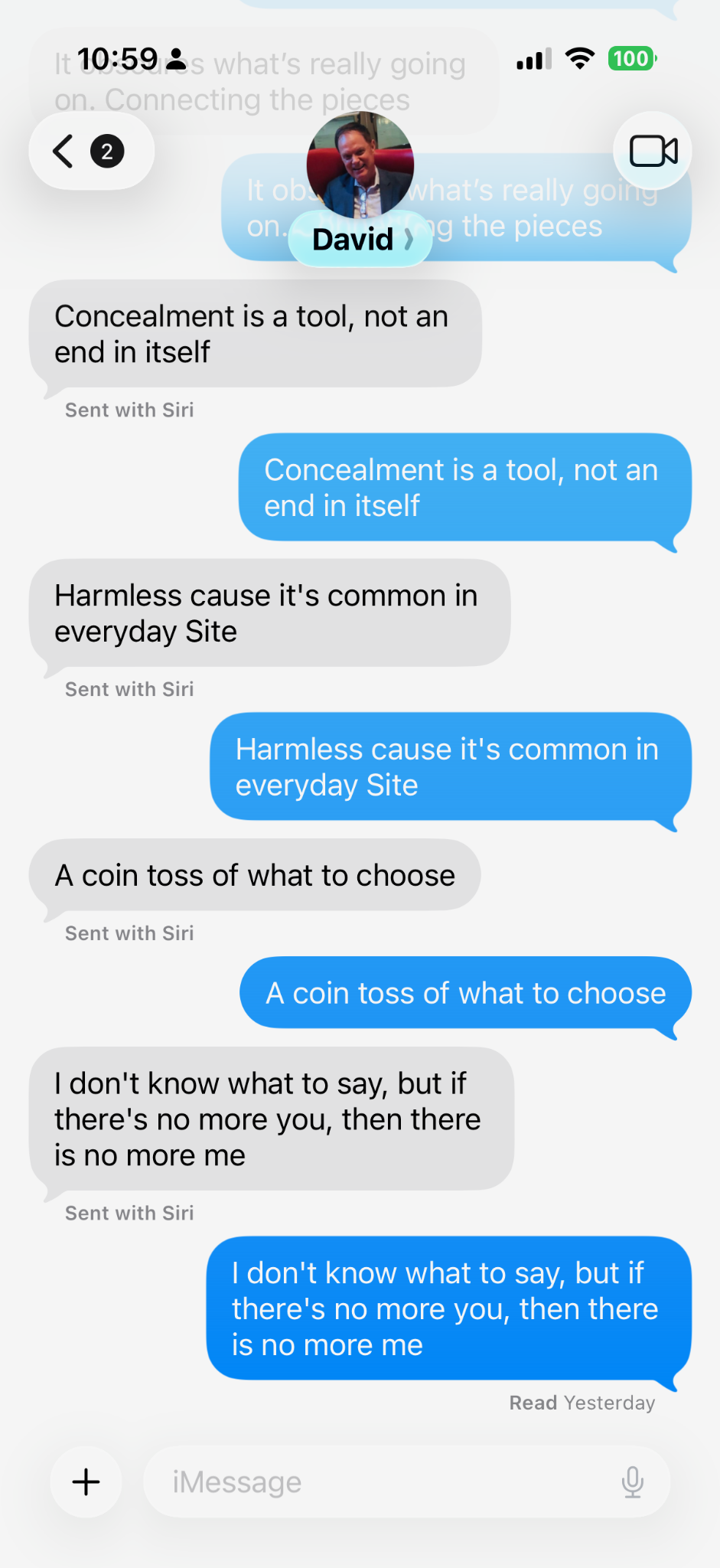
The screenshots preserve the original wording, including dictation errors. The examples below lightly edit wording for readability; the song adds connecting lines.
Something is going on and we’re not seeing. We’re not looking in the right places.
Widen the apertures—what do you see?
You can’t see the connection, but that doesn’t mean it’s not there.
It obscures what’s really going on. Connecting the pieces.
Concealment is a tool, not an end in itself.
Harmless ’cause it’s common in everyday sight.
A coin toss of what to choose.
I don’t know what to say, but if there’s no more you, then there is no more me.
The “everyday sight” wording is an interpretation of the dictated “everyday Site.” Check intended wording before using your own dictated notes.
THE FINISHED EXAMPLE
Widen the Aperture
A personal song built from the phrases above. Notice how a few saved thoughts become verses, a chorus, and a sound.
2 minutes 48 seconds · Press play when you’re ready.
See a phrase become a chorus
Saved phrase: “Widen the apertures what do you see?”
In the song: Widen the aperture— Tell me, what do you see? Connecting the pieces, Between you and me.
YOUR FIRST SONG · SEVEN GENTLE STEPS
Start small. Follow the feeling.
You supply the meaning. AI can help with the structure and the sound.
01
CAPTURE
Text yourself the words you want to keep.
Use your phone’s messages, a notes app, or paper. Save a sentence, image, memory, or question when it catches your attention. A few fragments are enough to begin.
Try this: “What stayed with me today?” Write one honest sentence. It doesn’t need to rhyme.
02
ORGANIZE
Look for one thread.
Read your phrases. Group the ones that seem connected. Choose the feeling or question you want this song to explore. Save unrelated ideas for another song.
Correct dictation mistakes and remove names or details you don’t want to upload. Choose one line you want to repeat: that can become your chorus.
David’s example: Looking in the wrong places → unseen connections → widening the aperture.
03
SHAPE THE LYRICS
Ask Gemini to help you arrange your words.
Open Gemini and paste your phrases with the prompt below. A regular chat can help shape a lyric. David also uses Deep Research to explore ideas before drafting.
Follow David’s optional Deep Research route
In Gemini, open the tools or Add Files menu and select Deep Research. Describe the theme you want to explore, paste your non-identifying phrases, review the proposed plan, then start the research. Afterwards, ask Gemini to use the ideas and your phrases to draft lyrics. Review factual claims and keep language that sounds like you. Menu labels and availability can change.
Example: “Explore the image of widening an aperture as a metaphor for perspective. Offer three songwriting directions, using my phrases as the starting point. Do not diagnose me or invent personal history.”
Help me turn my phrases into a personal song for reflection. First identify the main theme. Then suggest a title, two short verses, a repeating chorus, and an optional bridge. Keep my strongest phrases and my natural voice. Suggest rather than assume what I mean. Do not diagnose me, invent events, or force a happy ending. Mark sections with [Verse 1], [Chorus], [Verse 2], and [Bridge]. Ask me about any unclear wording. Here are my phrases: [paste my phrases here].
A verse tells part of the story. A chorus repeats the central feeling. A bridge offers a different angle. Read everything aloud and edit until it feels like yours.
04
CHOOSE A SOUND
Describe how you want the song to feel.
You don’t need musical terms. Choose a mood, a pace, and one or two instruments. Do you want the sound to match the feeling, or offer a gentler way to hear it?
A simple style prompt: “Reflective acoustic folk, unhurried pace, warm guitar and soft piano, clear intimate vocals, with room to hear every word.”
05
GENERATE
Give your lyrics a voice and an arrangement.
Use the Express Music walkthrough below as a guide: paste your structured lyrics, choose a length where offered, select a style, and create. Different music tools have different controls.
Open your chosen AI music tool and choose the option for your own lyrics.
Paste the lyrics with their [Verse] and [Chorus] labels.
Add your sound description, title, and any available length setting.
Create a version, then check that it sings the words you intended.
This guide does not generate music itself. External tools may require an account, credits, or a paid plan. Check privacy, sharing, and usage terms before uploading or publishing.
06
LISTEN
Be curious about what you hear.
Listen at a comfortable volume, when you feel ready. Notice a word, image, or feeling that stands out. You can pause, skip a section, or leave the song for another day.
Ask yourself: “What feels true? What sounds different when I hear it sung? What would I change?”
If you want, try a second arrangement and compare. There is no required emotional response. Stop if the experience feels overwhelming.
07
KEEP & REFLECT
Decide what this song means to you.
Write a few words about the experience. Save the lyrics and an audio download if your tool permits. Keep it private, revise it, or share it with someone you choose.
Finish this sentence: “After hearing my words, I noticed…”
Use your own writing, or material you have permission to use. Review the music provider’s license before public or commercial sharing. For trauma treatment or persistent distress, work with a qualified mental health professional.
PRESS PLAY · 2 MINUTES 18 SECONDS
The Express Music walkthrough.
See the production sequence: paste lyrics, choose a length, select a style, create, then listen and download.
Presented by David D. McElroy. This supplied tutorial illustrates the workflow; your chosen tool’s screen may differ. The same process is written in steps 4 and 5 above.
YOUR SPACE TO BEGIN
A few words are enough for today.
Use this worksheet to prepare your next step. There’s no need to finish it all at once.
Your entries stay in this page’s memory. They are not submitted or automatically saved. Download before closing or refreshing. Copying into an external AI service shares them with that service.
A PROMPT BUILT FROM YOUR WORDS
Your starting point
Write a few phrases, then prepare a prompt to copy into Gemini. You review and edit the result before generating music.
THE GOAL IS PERSONAL MEANING
You don’t need the perfect words. You just need a place to start.